

When something is wrong
Test and connect and Test again run five checks on the connection. When one fails, its row says why in words, with a How to fix link that lands on the section of this page named for it. The rows after it wait: a check that cannot pass makes the next ones meaningless.
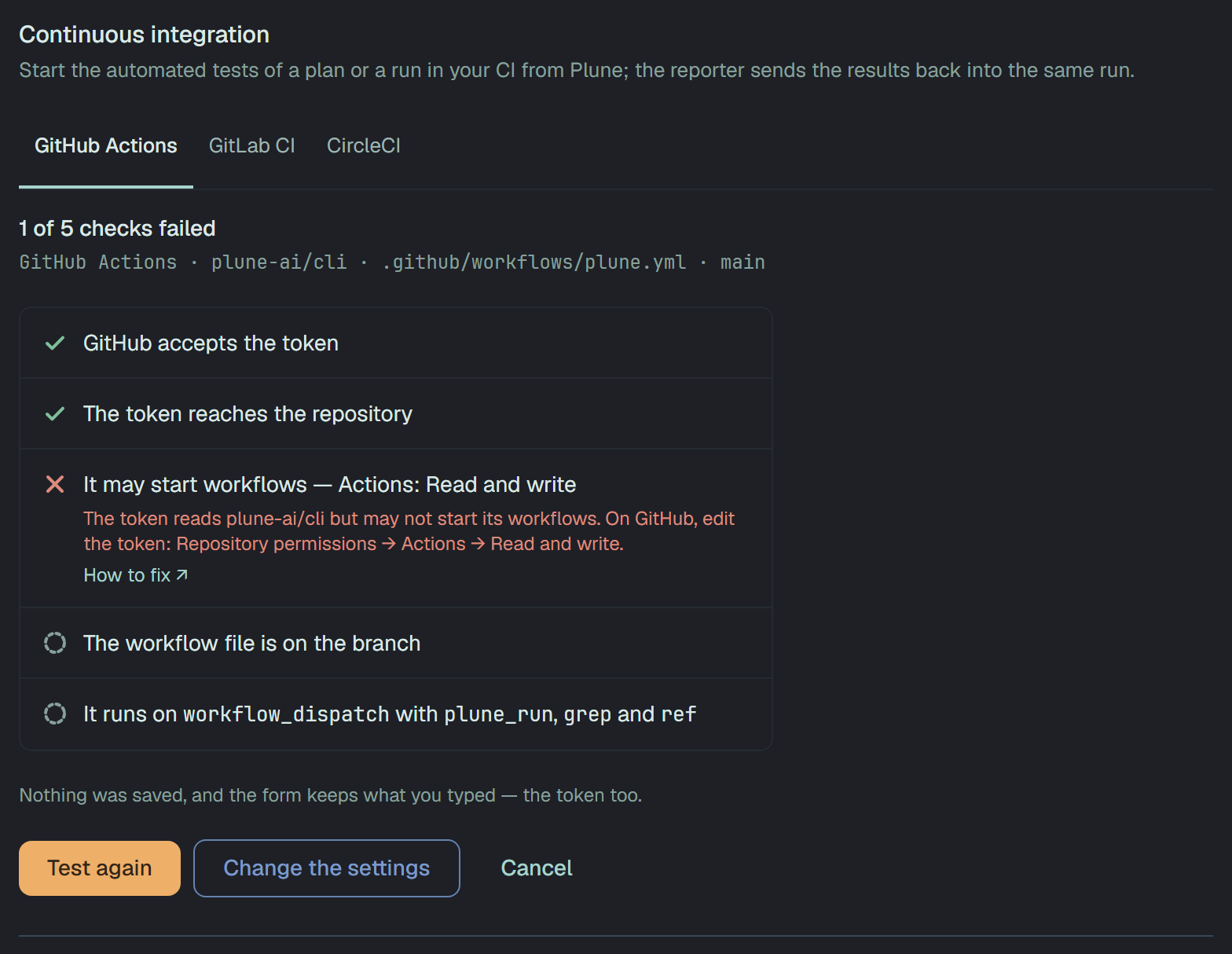
Nothing is saved while a check fails, and the form keeps what you typed. Fix what the row names, then Test again. A launch that the CI refuses says the same reason on the run’s page, under Could not start in CI, with Try again (below).
Unreachable
Section titled “Unreachable”Plune could not reach the CI — no answer in time (10 seconds for GitHub and CircleCI, 5 for GitLab), or no connection at all.
- Try again in a minute: the CI may be down or slow. Its status page says.
- For your own GitLab: the address must be reachable from the internet, over
https://, by a name that resolves. A GitLab only inside your network or behind a VPN cannot be connected. Check the GitLab URL for a typo.
Rate limited
Section titled “Rate limited”The CI is limiting the token’s requests for now — the token used up its requests for the hour, or asked too fast.
Wait, then Test again. Plune itself asks little — at most 10 checks a minute for a project, and one question a minute for each launch it watches — so a token that reaches the limit is usually used by something else too. Give Plune a token of its own.
Token rejected
Section titled “Token rejected”The CI does not accept the token: it is mistyped, expired or revoked.
- Make a new token and give it with Replace token (or paste it again into the form): GitHub’s fine-grained token, GitLab’s project access token, CircleCI’s personal API token.
- A space at an end or a missing character is the commonest cause of a pasted token.
- On a run’s page, when the saved token expired on a known day, the reason says which day.
Repository not found
Section titled “Repository not found”The token does not reach the repository, project or project slug.
- GitHub: the repository is not there under Repository, or the token was not given it. GitHub says not found, not forbidden, for a private repository a token cannot see. Edit the token: Repository access → Only select repositories → the repository; check the owner and the name.
- GitLab: the Project path is wrong, or the token belongs to another project. A project access token sees only its own project: make the token in this one, Settings → Access tokens.
- CircleCI: the Project slug is wrong, or the token’s user cannot see the project — not in its organization, or without access to the repository.
Actions denied
Section titled “Actions denied”The token may not start workflows or pipelines.
- GitHub: the token reads the repository but has no Actions → Read and write. Edit the token: Repository permissions → Actions → Read and write.
- GitLab: the token lacks the scope
api, or its role is below Developer. Make a new token with both and give it with Replace token. - CircleCI: CircleCI would not let the token’s user start a pipeline in the project. Give the machine user write access to the repository.
Workflow not found
Section titled “Workflow not found”The workflow or pipeline file is not there.
- GitHub: no workflow by that file name in the repository. Check Workflow file — it is the path in
.github/workflows— and that the file is on the repository’s default branch: GitHub knows a workflow from there. Add it as the template shows. - GitLab:
.gitlab-ci.ymlis not on the branch or tag. Add the job there, or choose the branch that has it. - CircleCI: CircleCI found no
.circleci/config.ymlon the branch. Add the config there.
Workflow disabled
Section titled “Workflow disabled”GitHub only: the workflow is switched off. A workflow can be disabled by hand, and GitHub switches some off by itself after a long time without activity.
Turn it on: Actions → the workflow → Enable workflow, then Test again.
Ref not found
Section titled “Ref not found”The branch or tag is not there.
- Check Branch or tag (on CircleCI, Branch) letter by letter, and push it if it lives only on your machine.
- Plune starts CircleCI pipelines on a branch; it does not take a tag there.
- A launch can name another branch than the connection’s: the same reason then means that branch.
No workflow dispatch
Section titled “No workflow dispatch”GitHub only: the workflow does not run on workflow_dispatch — the trigger Plune uses to start it.
Add the trigger with the three inputs, as the template shows:
on: workflow_dispatch: inputs: plune_run: required: true grep: required: false ref: required: falseThe workflow may keep its other triggers.
Inputs missing
Section titled “Inputs missing”The workflow, job or config does not take everything Plune sends. The row names what is missing.
- GitHub: the workflow runs on
workflow_dispatchbut lacks the inputplune_run,greporref. Add them to itsinputs:as the template shows. - GitLab:
.gitlab-ci.ymldoes not namePLUNE_RUNorPLUNE_GREP— there is no job for the pipeline Plune starts. Add the job withrules: - if: $PLUNE_RUNand--grep "$PLUNE_GREP". The check reads the file itself, so a job that only aninclude:brings in is not seen. A launch says the same when GitLab finds no job to run in the pipeline. - CircleCI: the config does not declare the pipeline parameter
plune_runorgrep. Declare both underparameters:withtype: string, as the template shows.
Variables denied
Section titled “Variables denied”GitLab only: the project does not let the token’s role set pipeline variables, and Plune passes the run
in them (PLUNE_RUN, PLUNE_GREP).
In the project: Settings → CI/CD → Variables → Minimum role to use pipeline variables → Developer, the role of the token. A project set to a higher role, or to nobody, refuses the pipeline.
Address refused
Section titled “Address refused”GitLab only: Plune sends nothing to the GitLab URL. The address is not https://, is an IP address, is
or resolves to a private or internal network address, or answered with a redirect.
Use the https:// name your GitLab is reached by from the internet, with no path that redirects. A
GitLab that answers only inside your network cannot be connected
(Your own GitLab).
Unexpected
Section titled “Unexpected”The CI answered in a way Plune does not expect here. When it gave an HTTP status, the row says it — GitHub answered 502 — and never more of the answer.
- Try again: a
5xxis usually the CI having a bad minute. - The check also ends here when the CI started what it should have refused — a run on GitHub, a compiled pipeline on CircleCI. Plune cancels it at once. Check that no other input or parameter of the workflow or config makes it accept anything.
- If it repeats, write to us with the status and the CI.
When a launch is refused
Section titled “When a launch is refused”A launch from a plan or a run can be refused for the same reasons as a check; the run’s page says it under Could not start in CI and offers Try again, which starts the same tests with the same key. Two more can appear there:
- No CI is connected. The connection was removed after the run was set to run in CI. An owner connects one in Settings → Integrations. A launch already under way when the connection went is left to its reporter: the page says The CI connection was removed — Plune keeps waiting for the reporter.
- The saved token cannot be read on this server — replace it. The platform’s key changed since the token was saved. An owner gives the token again with Replace token.
What the page says after a launch started — waiting, not started in 15 minutes, no report, Plune stopped waiting — is in What Plune watches.