

Files in your own bucket
A test run leaves files behind: a Playwright trace, a video, screenshots, a log or a JSON answer. A project can keep all of them in a bucket you own — on AWS S3, Cloudflare R2 or any S3-compatible storage — instead of on Plune’s servers. The bucket is under your rules and on your bill; Plune never holds a copy of the bytes.
An owner of the project connects it in Settings → Storage. The pages of this section are the other half of that screen:
| Page | Read it to |
|---|---|
| AWS S3 | create a private bucket and a key that can touch one folder |
| Cloudflare R2 | create a bucket and a token scoped to it |
| Other S3-compatible storage | fill the Other form for Backblaze B2 (with its free daily caps), Wasabi, IDrive e2, MinIO, DigitalOcean Spaces or Google Cloud Storage |
| CORS | let the dashboard open text and JSON files in a result’s panel |
| Who can do what | see what each person, the CI and Plune itself may do, and replace or revoke a key |
| When something is wrong | fix the check that failed |
What goes where
Section titled “What goes where”| With a bucket connected | Without one |
|---|---|
| Every new file goes to your bucket: screenshots, text and JSON, traces, videos and other files. | Screenshots, and JSON and text files, go to Plune’s built-in storage (below). Traces, videos and other files stay in the CI run; Plune keeps only their names. |
A file a person adds in the dashboard — to a case or to the case being marked — goes the same way: to your bucket when one is connected, to the built-in storage when not, with the same ceilings.
Files already in Plune’s built-in storage stay there until the run is deleted for good. Connecting a bucket does not move them, and disconnecting one does not touch the files in it.
What works where
Section titled “What works where”Each cell is what a person sees in the result’s panel. Built-in storage is what a project has until it connects a bucket, so the first column is also the column of a project with no bucket.
| File | Built-in storage (no bucket) | Own bucket, no CORS rule | Own bucket, with the CORS rule |
|---|---|---|---|
| Screenshot | kept, up to 2 MB; shown as a picture | stored; shown as a picture (an <img> tag needs no rule) | stored; shown as a picture |
| Video | not kept: the name only, in the CI run ↗ | stored; plays in the panel (a <video> tag needs no rule) | stored; plays in the panel |
| Trace | not kept: the name only, no Open | stored; Open says Your bucket didn’t let Plune read this trace, and Download trace still works | stored; Open shows the trace window |
| Text, JSON, log | kept, up to 512 KB; Open shows it in a window | stored; Open says the bucket’s CORS rule does not allow the dashboard | stored; Open shows it in a window |
| Any other file (a zip, a PDF, …) | not kept: the name only | stored; Open downloads it (not checked in a browser) | stored; Open downloads it |
The CI uploads work in every column: they do not go through CORS. A file a person adds in the dashboard needs the rule too (CORS). The limits of a file are above for a bucket and below for the built-in storage.
What Plune keeps
Section titled “What Plune keeps”For each file in your bucket Plune keeps one line: its name, type, size, the state of the upload and the path it lies under. It does not keep the bytes. The secret access key you give is stored encrypted and is never shown again, to anyone; Settings → Storage shows only the last four characters of the access key ID, to tell two keys apart.
A file’s key in the bucket is built by Plune, never by the client:
<folder>/<project id>/<run id>/<result id>/<file id>-<file name> a result's file<folder>/<project id>/cases/<case id>/<file id>-<file name> a case's own file<folder>/<project id>/<run id>/cases/<case id>/<file id>-<file name> added to the case being markedA file added to the case being marked keeps its key once the mark takes it onto the result.
<folder> is the Folder you set, plune by default. Everything of one project lies under its own
<folder>/<project id>/, so two projects can share one bucket without touching each other’s files,
and a policy on plune/* is enough for Plune (AWS S3).
How a file travels
Section titled “How a file travels”Plune does not carry the bytes. It checks who is asking, then hands out a short-lived signed link to your bucket, and the file goes straight between the browser or the CI and the bucket:
| Link | Lives | Handed to |
|---|---|---|
| To write a file | 15 minutes | the CI, after it proves the project’s token; a person adding a file in the dashboard, after Plune checks they may (an owner or a member) |
| To read a file | 10 minutes | a member of the project, after Plune checks the membership |
Someone who is not a member of the project, and a result that does not exist, get the same answer: not found. The signed link carries the access key ID (not the secret), so a person who copies a link sees which key signed it — and cannot do anything with the link after its minutes are over.
The limits of a file
Section titled “The limits of a file”A file that goes to your bucket may be:
| Kind | At most |
|---|---|
| Picture | 10 MB |
| Text, JSON, log | 5 MB |
| Video | 100 MB |
| Trace | 100 MB |
| Any other file | 50 MB |
and one result may hold 30 files, in your bucket and in Plune’s built-in storage together. Here 1 MB is 1,048,576 bytes. Plune does not count your bucket against the project’s storage budget; what the bucket holds is your bill.
The built-in storage
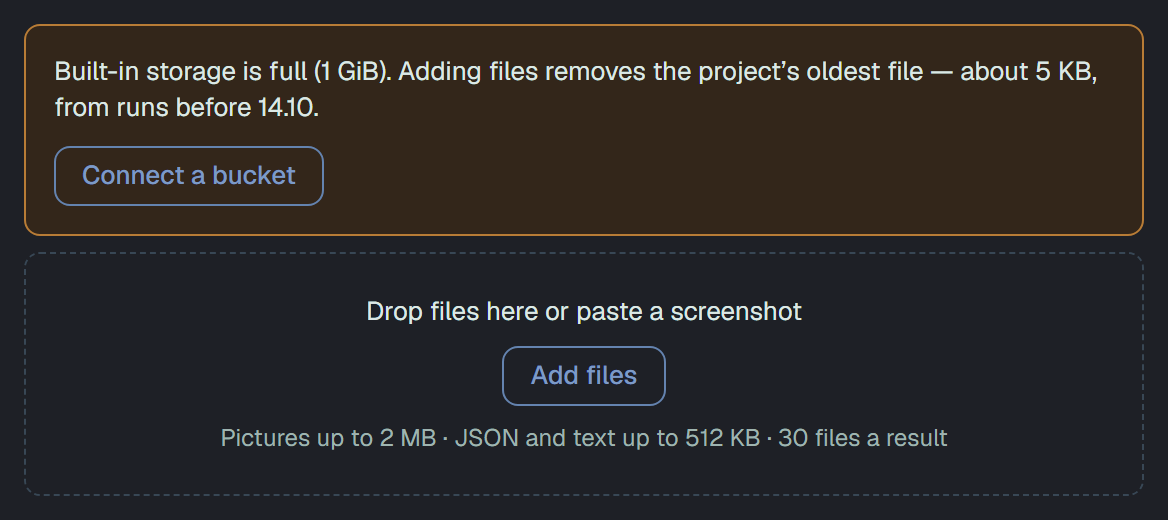
Section titled “The built-in storage”Until a bucket is connected, screenshots (up to 2 MB each) and JSON or text files (up to 512 KB each) are kept in Plune itself, within 1 GB per project — a reporter’s and the ones people add alike. When a new file would take a project over, its oldest files leave first to make room, whoever added them. Traces and videos are not kept there at all.
A person is told both ways. Before an upload, while the next picture would send files away, the zone
says how much of the oldest would go and from when, beside Connect a bucket; the files can still be
added. After one that made room, the zone says how many went and how much. The project’s audit log has
it too, as a project/event.
GET on a case’s or a marked case’s files answers what adding one costs as budget —
usedBytes, limitBytes, and evicts (count, bytes, newestAt of what a 2 MB picture would send
away now, null when nothing would, and always with a bucket). The upload’s answer has evicted
(count, bytes) when something went. This is the same storage described in
A result in a run; a bucket is how you keep the heavy files and more of
everything.
Viewing the files
Section titled “Viewing the files”Files that lie in your bucket are read by the dashboard through short-lived links; the one thing your bucket needs for that is a CORS rule. The same rule lets a person’s file reach the bucket from the dashboard.
Two clocks: who deletes what
Section titled “Two clocks: who deletes what”Plune’s history of results and the objects in your bucket are two separate things, and each has its own clock.
| Kept by | What it does | |
|---|---|---|
| The history of results in Plune | Plune (your plan, the Bin, the final purge) | deletes the lines; the objects it wrote stay in your bucket for now (#948) |
| The objects in your bucket | you (your own lifecycle rules) | may delete a file earlier or later than Plune would |
Plune does not read the lifecycle rules of your bucket and does not depend on them. What follows:
- Your rule is shorter than the history. The result stays in Plune, and its file says no longer in your bucket. Nothing breaks.
- Your rule is longer, or you have none. When Plune deletes a result for good, it deletes its lines; the files it wrote for that result stay in your bucket until your rule or you remove them, on your bill. Deleting them with the result is #948. The one object Plune removes by itself today is that of an upload that was never finished, the night after.
- The Bin (a run you deleted and may still restore) keeps the lines and the objects, so that a restore brings everything back. When the lines disappear for good, the objects stay, as above (#948).
A rule that expires objects under plune/ after about 200 days is a sensible default — long enough
for the history most projects read — but it is a suggestion, not a requirement. How to set a rule:
AWS S3, Cloudflare R2,
and the S3-compatible providers.
Not tied to a language
Section titled “Not tied to a language”The bucket does not care what wrote the files. Today the Playwright reporter for TypeScript uploads them; when reporters for other runners arrive, this section stays the same and only their guides are added.