

Test an MCP server
From CLI 0.34.5 four commands of @plune-ai/cli test any MCP
server — your own or someone else’s, started over stdio or reached over HTTP:
| Command | The question it answers |
|---|---|
plune mcp check | Does the server start, finish the handshake and answer the basic requests? |
plune mcp lint | What in its tool list makes a model choose the wrong tool, or call it wrong? See Lint an MCP server. |
plune mcp snapshot | What is its contract — tools, resources, prompts, capabilities — as one file to commit? |
plune mcp diff | What changed in that contract, and does the change break a client? See Snapshot and diff. |
None of them needs a Plune account, and none of them talks to the Plune platform. Each one starts
the server you name after --, or connects to the address you give with --url, and talks to
nothing else. This page is about testing a server; for the server that gives an agent the Plune
tools, see Plune tools for AI agents.
Quick start
Section titled “Quick start”With Node.js installed and nothing else, this lints the tool list of the reference server of the MCP project:
$ npx -y @plune-ai/cli@0.39.9 mcp lint -- npx -y @modelcontextprotocol/server-everything@2.2.1Server: mcp-servers/everything 2.2.1 · stdio · 16 tools
warn  echo                         name-style-mismatch  "echo" does not follow the naming style of the other tools.  expected: kebab-case; actual: snake_case  fix: Name the tool in the style the other tools of the server use.warn  trigger-list-changed         desc-no-when-not  The description does not say when not to use the tool, and "trigger-resource-update" is similar to it.  expected: a "when not to use" clause; actual: none found  fix: Add when not to use the tool and what to use instead ("Do not use for …; use … instead").warn  trigger-list-changed         list-no-paging  "trigger-list-changed" returns a list by its name, but cannot be asked for less.  expected: one of: limit, cursor, page, offset, pagesize, perpage, per_page, page_size, pagetoken, page_token; actual: parameters: list  fix: Let the caller bound the answer: add a limit and a cursor (or page) parameter.warn  trigger-resource-update      desc-no-when-not  The description does not say when not to use the tool, and "trigger-list-changed" is similar to it.  expected: a "when not to use" clause; actual: none found  fix: Add when not to use the tool and what to use instead ("Do not use for …; use … instead").warn  trigger-resource-update      hint-readonly-writes  "trigger-resource-update" is marked read-only, but its name says it changes something.  expected: readOnlyHint: false; actual: readOnlyHint: true  fix: Set readOnlyHint to false if the tool changes anything, or rename it if it does not.  spec: https://modelcontextprotocol.io/specification/2025-11-25/schema#toolannotations-readonlyhintwarn  trigger-resource-update.uri  param-type-by-name  The name "uri" suggests a url, but the parameter is a free string.  expected: a url type or format; actual: type string, no format  fix: Give the parameter the type its name promises (number, boolean), or a "format" (date-time, uri).32 info findings not shown (--show-info shows them).stale: plune-mcp-ignore.yaml:2: the exception for list-no-paging on list_notes matched no finding.
0 errors, 6 warnings, 32 info, 0 suppressed · failing on: error$ echo $?0
The warnings are advice: by default only an error fails the run, so it exits 0. The info
findings are counted, not printed; --show-info prints them. Each finding names the tool, the rule,
what was expected and what the server has, and how to fix it.
The reference server’s package asks for Node.js 24 or later. On an older Node.js, npm may print a warning about it before the output above.
What each command checks
Section titled “What each command checks”plune mcp check: does it start and answer
Section titled “plune mcp check: does it start and answer”It runs nine checks in order — start, initialize, protocol-version, capabilities,
tools-list, resources-list, resource-templates-list, prompts-list, ping — each with a
state and one sentence on what it saw. On the sample server from
Lint an MCP server, which declares only tools:
$ npx -y @plune-ai/cli@0.39.9 mcp check -- node server.mjsServer: mcp-sample-server 1.0.0 · stdio · protocol 2025-11-25
passed          start                    the server process startedpassed          initialize               serverInfo: mcp-sample-server 1.0.0passed          protocol-version         2025-11-25, the latest this client offeredpassed          capabilities             declared: toolspassed          tools-list               3 tools in 1 pagenot-applicable  resources-list           the server does not declare resourcesnot-applicable  resource-templates-list  the server does not declare resourcesnot-applicable  prompts-list             the server does not declare promptspassed          ping                     answered
6 passed, 0 failed, 0 could not run, 3 not applicableHealthy: every check that applies passed.$ echo $?0
A list the server does not declare is not-applicable: it does not count against the server.
--smoke goes one step further and calls tools, at most --smoke-limit of them (5 by default),
always with {} as the arguments. It calls a tool only when the tool says readOnlyHint: true,
does not say destructiveHint: true and has no required parameter. --allow-write-calls adds tools
that are not read-only but say destructiveHint: false, still only those without required
parameters; a tool that says destructiveHint: true is never called.
$ npx -y @plune-ai/cli@0.39.9 mcp check --smoke -- npx -y @modelcontextprotocol/server-everything@2.2.1Server: mcp-servers/everything 2.2.1 · stdio · protocol 2025-11-25
passed  start                    the server process startedpassed  initialize               serverInfo: mcp-servers/everything 2.2.1passed  protocol-version         2025-11-25, the latest this client offeredpassed  capabilities             declared: prompts, resources, logging, tools, completionspassed  tools-list               16 tools in 1 pagepassed  resources-list           8 resources in 1 pagepassed  resource-templates-list  4 resource templates in 1 pagepassed  prompts-list             4 prompts in 1 pagepassed  ping                     answered
Smoke (--smoke, at most 5 tools, arguments {}):  passed  get-env                 answered without isError  passed  get-resource-links      answered without isError  passed  get-resource-reference  answered without isError  passed  get-tiny-image          answered without isError  passed  trigger-log-messages    answered without isError  1 tool not called: smoke-limit (trigger-long-running-operation)  7 tools not called: required-arguments  3 tools not called: not-read-only (gzip-file-as-resource, toggle-simulated-logging, toggle-subscriber-updates)
9 passed, 0 failed, 0 could not run, 0 not applicableSmoke: 5 passed, 0 failed, 0 could not run, 11 not calledHealthy: every check that applies passed.$ echo $?0
plune mcp lint: what confuses a model
Section titled “plune mcp lint: what confuses a model”It reads the whole tool list and reports missing descriptions, look-alike tools, a string where an
enum belongs, a list tool that cannot be asked for less, a list that costs too much context, and
schemas that break the specification. Every finding has a stable rule id and a level. The rules,
the levels and the exceptions file are on Lint an MCP server.
plune mcp snapshot and plune mcp diff: what changed
Section titled “plune mcp snapshot and plune mcp diff: what changed”snapshot writes the server’s contract as JSON that is the same byte for byte for the same server, so
it can live in the repository. diff compares it with a pull request’s build and calls every change
breaking, non-breaking or informational. See Snapshot and diff.
Exit codes
Section titled “Exit codes”The four commands share one meaning per code:
| Exit | Meaning |
|---|---|
0 | Nothing at the --fail-on level, and everything was measured. For snapshot: the file was written. |
1 | A finding (lint), a failed check or smoke call (check), or a change (diff) at the --fail-on level. snapshot has no 1. For check, a server process that started and exited before it answered initialize is a failed initialize: the last lines of its stderr, secrets masked, are in the report. |
2 | Nothing about the server is proven, and you can fix why: the command was not found or did not start, the server exited before it answered (lint, snapshot, diff; the last lines of its stderr are printed, secrets masked), it could not be reached or answered 401 or 403, a file cannot be read, or a flag is wrong. |
3 | Nothing was measured: the server lists no tools, there is nothing to compare, or a check could not run. Not measured is not a pass. |
Each command’s own table — what exactly makes it exit 2 or 3 — is in the
CLI reference.
States
Section titled “States”Every check, rule and call ends in one of these states:
| State | Meaning |
|---|---|
passed | It got the answer it asked for. |
failed | The server answered wrong: a JSON-RPC error, a lost connection, a list that is not a list, a finding at the level that fails the run. |
not-applicable | It does not apply: the server did not declare the capability, or a tool was not called (the reason says why). |
could-not-run | It was not measured: no answer within the time limit, or something before it did not finish. |
pending | Reserved. check does not report it; a JUnit file would hold it as <skipped type="pending">. |
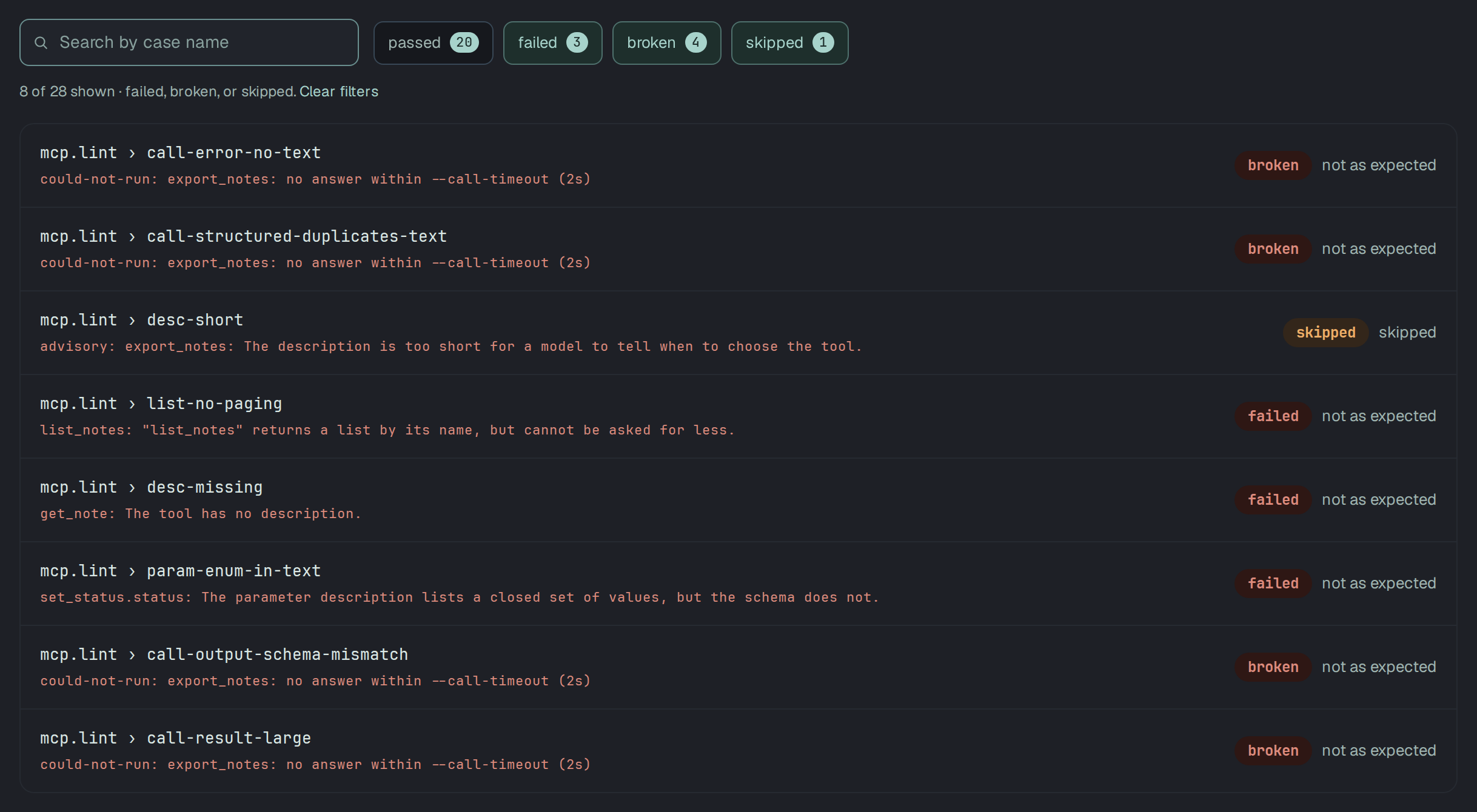
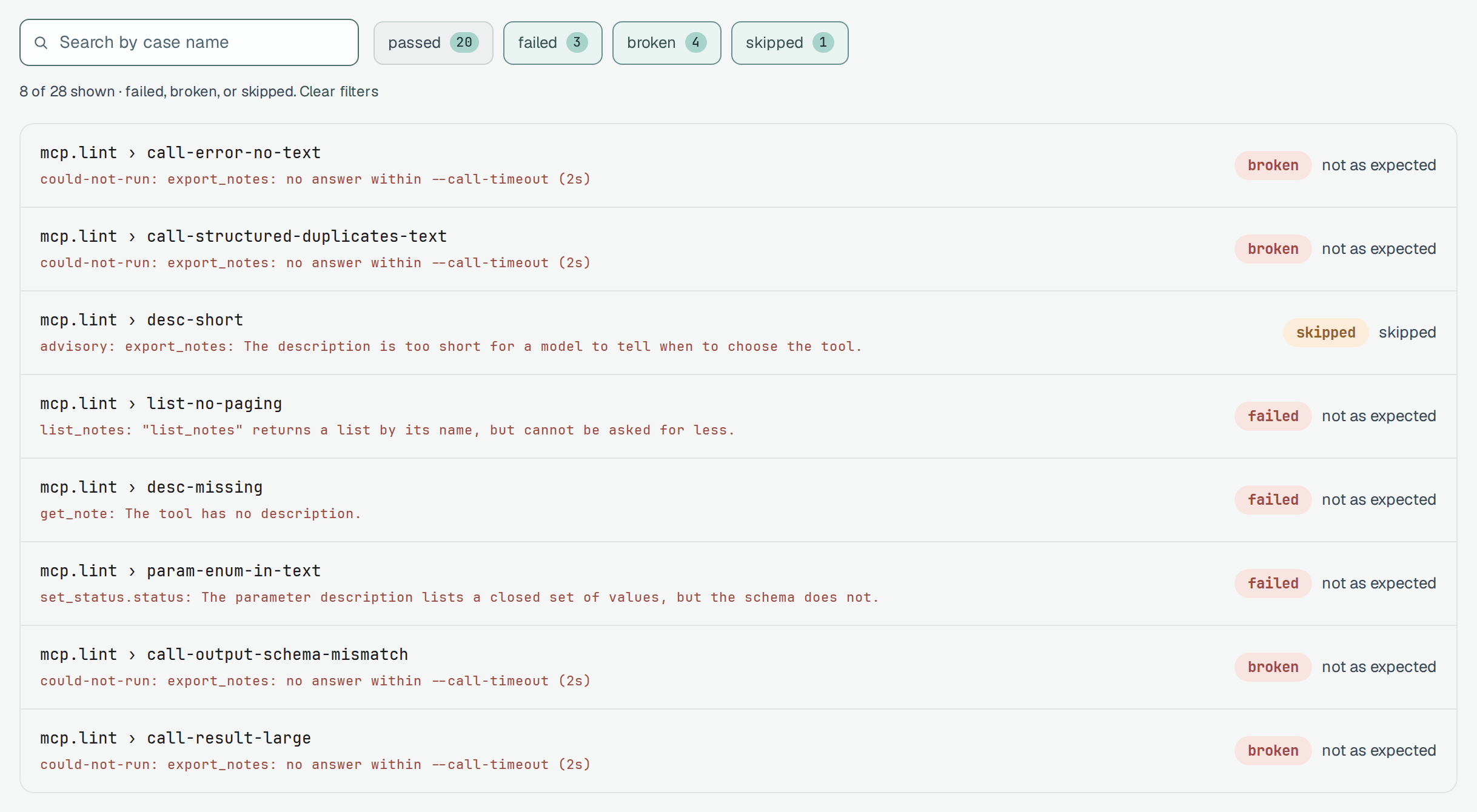
could-not-run is never green. A server that does not answer is not a server that passed: the run
cannot exit 0 (it exits 3, or 1 when something also failed), the JUnit file marks the case as an
error, and Plune shows it as broken. A check that
times out tells you nothing about the server, and a gate that counted it as a pass would let a
server that hangs on every request through.
Connect the server
Section titled “Connect the server”A stdio server
Section titled “A stdio server”Everything after -- is the command that starts the server, as you would type it:
npx -y @plune-ai/cli mcp check -- node dist/server.jsnpx -y @plune-ai/cli mcp lint -- python -m my_servernpx -y @plune-ai/cli mcp lint --env LOG_LEVEL=warn --cwd ./server -- node index.js--env KEY=VALUE sets a variable for the server process, --env KEY passes that variable on from
your environment, and --cwd is the folder the server starts in. --timeout (default 30s) bounds
the start and the handshake.
An HTTP server
Section titled “An HTTP server”--url connects to a server that is already running, over Streamable HTTP (--sse for the older
HTTP+SSE transport). In CI the server usually starts a moment before the command; --wait keeps
check trying until it answers:
$ npx -y @plune-ai/cli@0.39.9 mcp check --url http://127.0.0.1:3001/mcp --wait 20s --header-env "Authorization=MCP_AUTHORIZATION"Server: mcp-servers/everything 2.2.1 · http · protocol 2025-11-25
passed  start                    the server answered at --urlpassed  initialize               serverInfo: mcp-servers/everything 2.2.1passed  protocol-version         2025-11-25, the latest this client offeredpassed  capabilities             declared: prompts, resources, logging, tools, completionspassed  tools-list               16 tools in 1 pagepassed  resources-list           8 resources in 1 pagepassed  resource-templates-list  4 resource templates in 1 pagepassed  prompts-list             4 prompts in 1 pagepassed  ping                     answered
9 passed, 0 failed, 0 could not run, 0 not applicableHealthy: every check that applies passed.$ echo $?0
A header with a secret goes in with --header-env "Name=ENV_VAR": the value is read from that
variable, so it is never on the command line, in the shell history or in the list of processes.
Above, MCP_AUTHORIZATION holds Bearer <token>. --header "Name: value" exists for headers that
are not secret.
The values you pass for the connection — --env and header values, a secret in the URL, each
argument of the command of 8 characters or more — are masked wherever the server repeats them. No
report file holds the URL, the command, its environment or the headers.
plune mcp check does not discover or run OAuth: a server that answers 401 or 403 exits 2, and
the fix is the credentials you pass with --header-env.
A run in Plune
Section titled “A run in Plune”lint, check and diff write JUnit XML, and plune run import turns that file into a run in
Plune — the one step here that talks to the platform, and the one that needs PLUNE_TOKEN:
npx -y @plune-ai/cli mcp lint --reporter junit-xml --out lint.xml -- node dist/server.jsnpx -y @plune-ai/cli run import lint.xml--out is repeatable, so one run of the server writes every form at once:
--out json=lint.json --out junit-xml=lint.xml --out markdown=lint.md.
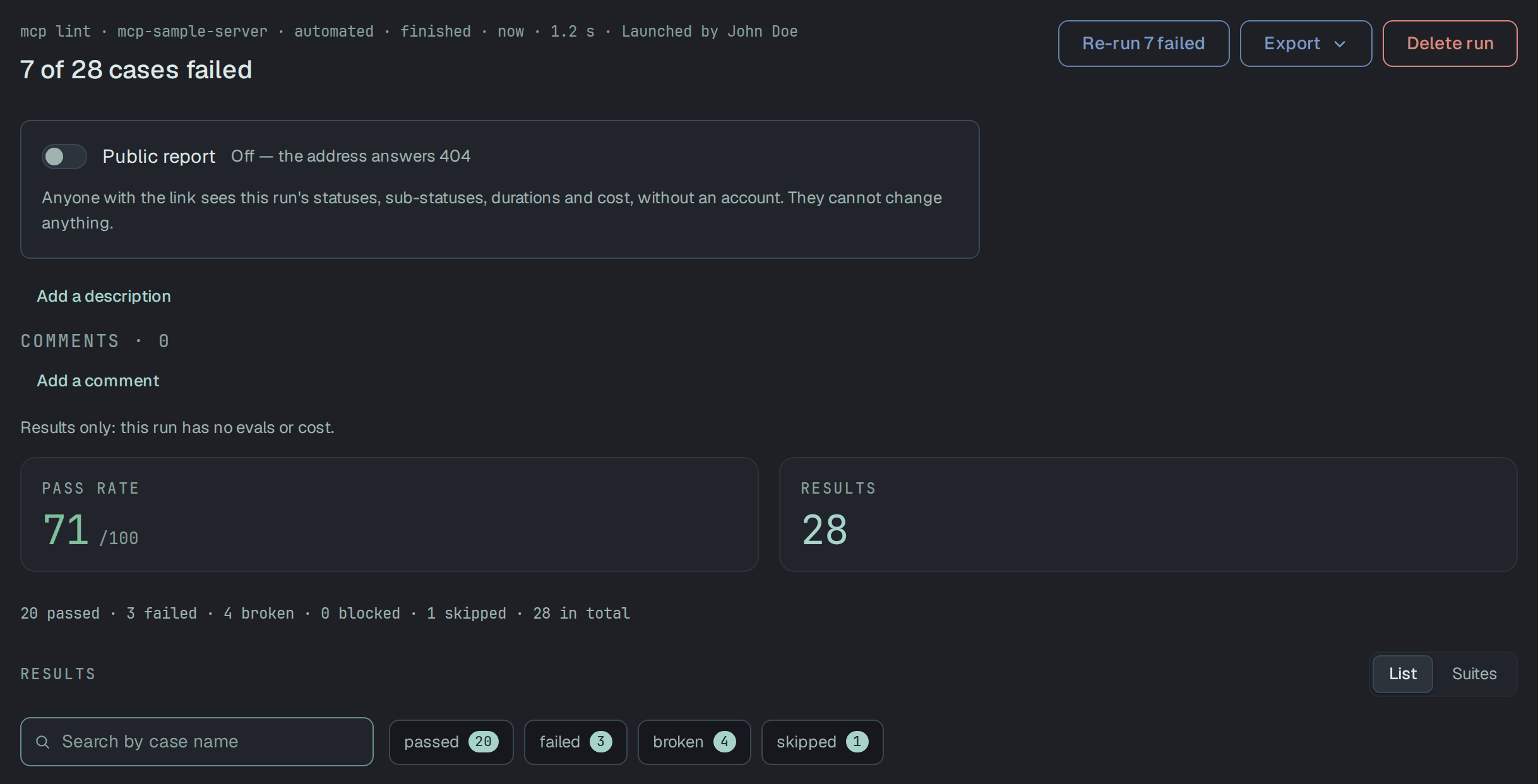
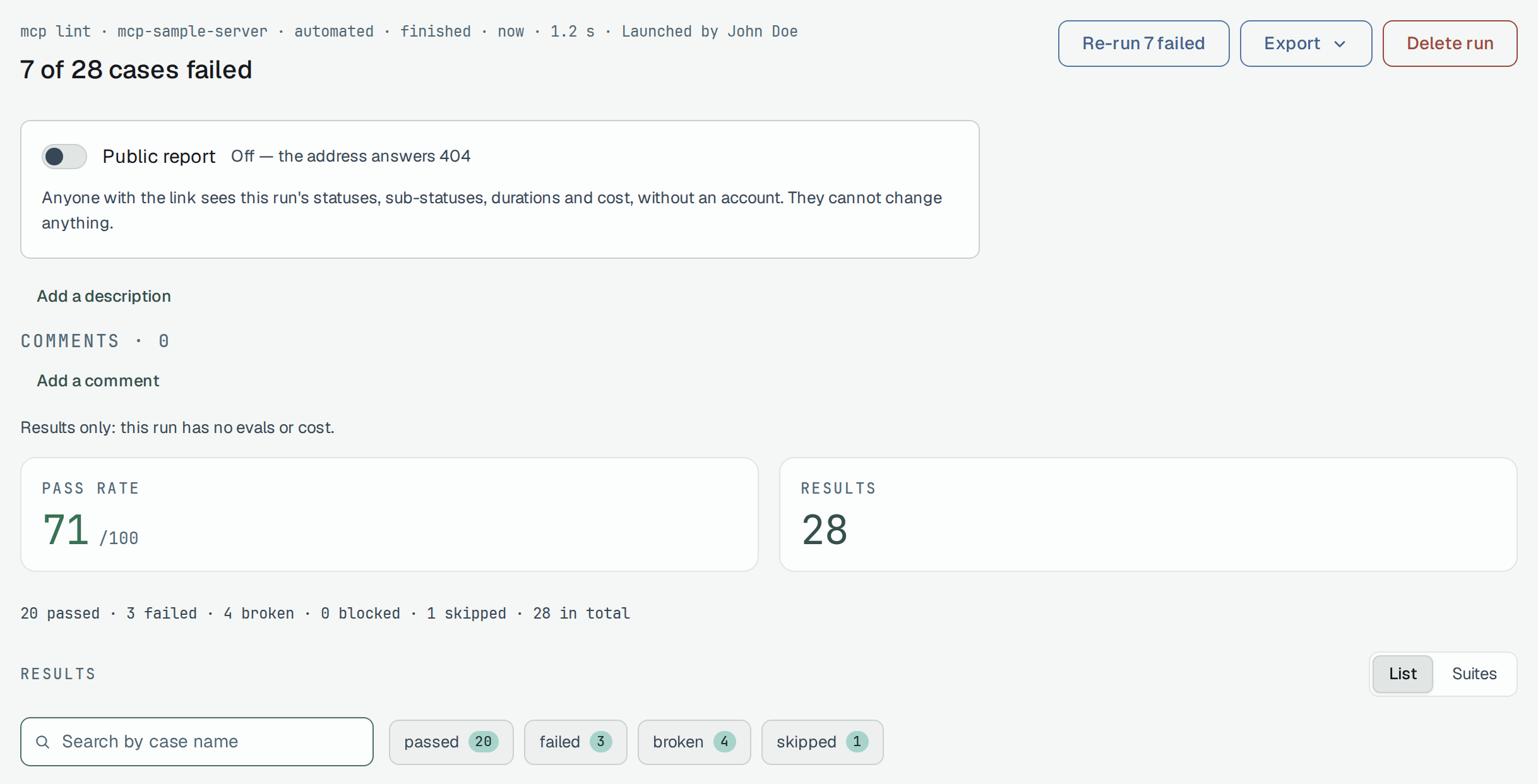
lint writes one case per rule of its catalog and one for tools-list, not one per tool: the tools a
rule found are listed in the case’s text. check writes one case per check and one for smoke, and diff four
(breaking-changes, contract-changes, unclassified-changes, security-signals). With the
project’s default status map, the states arrive as:
| State | In the JUnit file | In Plune |
|---|---|---|
passed | <testcase> with nothing inside | passed |
failed, and it fails the run | <failure> | failed |
failed, but only advice (below --fail-on) | <skipped type="advisory"> | skipped |
could-not-run | <error type="could-not-run"> | broken |
not-applicable | <skipped type="not-applicable"> | skipped |
The file and the exit code agree: exit 1 exactly when a case is a <failure>, exit 3 when none is
and one is an <error>. A project that changed its status map for JUnit reads these files by its own
map. More on the import itself is in Files from JUnit & Allure.
The JUnit file of the sample server’s lint, as written
<?xml version="1.0" encoding="UTF-8"?><testsuites name="plune mcp lint" tests="28" failures="0" errors="0" skipped="7"> <testsuite name="plune mcp lint" tests="28" failures="0" errors="0" skipped="7"> <testcase classname="mcp.lint" name="tools-list"/> <testcase classname="mcp.lint" name="input-schema-not-object"/> <testcase classname="mcp.lint" name="output-schema-not-object"/> <testcase classname="mcp.lint" name="required-unknown-property"/> <testcase classname="mcp.lint" name="name-duplicate"/> <testcase classname="mcp.lint" name="name-invalid"/> <testcase classname="mcp.lint" name="desc-missing"> <properties> <property name="plune.mcp.tool" value="get_note"/> </properties> <skipped type="advisory" message="advisory: get_note: The tool has no description.">get_note: The tool has no description.expected: a descriptionactual: nonefix: Describe what the tool does, when to use it and when not to: the model chooses tools by name and description alone. The specification does not require a description; this is advice on quality.spec: https://modelcontextprotocol.io/specification/2025-11-25/schema#tool-description</skipped> </testcase> <testcase classname="mcp.lint" name="desc-short"/> <testcase classname="mcp.lint" name="desc-long"/> <testcase classname="mcp.lint" name="desc-no-when-not"/> <testcase classname="mcp.lint" name="tools-similar"/> <testcase classname="mcp.lint" name="param-enum-in-text"> <properties> <property name="plune.mcp.tool" value="set_status"/> </properties> <skipped type="advisory" message="advisory: set_status.status: The parameter description lists a closed set of values, but the schema does not.">set_status.status: The parameter description lists a closed set of values, but the schema does not.expected: an enumactual: a free string described as "The new status: one of open, done, archived."fix: List the allowed values in "enum" rather than in the description, so the client can check them.</skipped> </testcase> <testcase classname="mcp.lint" name="param-type-by-name"/> <testcase classname="mcp.lint" name="param-desc-missing"/> <testcase classname="mcp.lint" name="param-example-missing"/> <testcase classname="mcp.lint" name="required-missing"/> <testcase classname="mcp.lint" name="name-style-mismatch"/> <testcase classname="mcp.lint" name="name-not-snake"/> <testcase classname="mcp.lint" name="annotations-missing"/> <testcase classname="mcp.lint" name="hint-readonly-writes"/> <testcase classname="mcp.lint" name="hint-destructive-understated"/> <testcase classname="mcp.lint" name="hint-idempotent-missing"/> <testcase classname="mcp.lint" name="list-no-paging"> <properties> <property name="plune.mcp.tool" value="list_notes"/> </properties> <skipped type="advisory" message="advisory: list_notes: "list_notes" returns a list by its name, but cannot be asked for less.">list_notes: "list_notes" returns a list by its name, but cannot be asked for less.expected: one of: limit, cursor, page, offset, pagesize, perpage, per_page, page_size, pagetoken, page_tokenactual: parameters: nonefix: Let the caller bound the answer: add a limit and a cursor (or page) parameter.</skipped> </testcase> <testcase classname="mcp.lint" name="list-size"/> <testcase classname="mcp.lint" name="call-result-large"> <skipped type="not-applicable" message="not-applicable: --call was not given: no tool was called">--call was not given: no tool was calledexpected: an answer of the tool to judgeactual: --call was not given: no tool was calledfix: Return less by default: a page with a cursor, a summary with the details behind another call, or fewer fields.</skipped> </testcase> <testcase classname="mcp.lint" name="call-error-no-text"> <skipped type="not-applicable" message="not-applicable: --call was not given: no tool was called">--call was not given: no tool was calledexpected: an answer of the tool to judgeactual: --call was not given: no tool was calledfix: Put what went wrong and what to do about it in a text block of the error result: the model reads it to try again.spec: https://modelcontextprotocol.io/specification/2025-11-25/server/tools</skipped> </testcase> <testcase classname="mcp.lint" name="call-structured-duplicates-text"> <skipped type="not-applicable" message="not-applicable: --call was not given: no tool was called">--call was not given: no tool was calledexpected: an answer of the tool to judgeactual: --call was not given: no tool was calledfix: Clients that read structuredContent get the data twice. Keep the JSON text only for clients that need it, or make the text a short summary of the result.</skipped> </testcase> <testcase classname="mcp.lint" name="call-output-schema-mismatch"> <skipped type="not-applicable" message="not-applicable: --call was not given: no tool was called">--call was not given: no tool was calledexpected: an answer of the tool to judgeactual: --call was not given: no tool was calledfix: Return structuredContent that matches the outputSchema the tool lists, or change the schema to what the tool returns.spec: https://modelcontextprotocol.io/specification/2025-11-25/schema#tool-outputschema</skipped> </testcase> </testsuite></testsuites>