

Compare runs
Compare runs puts two to ten runs of a project side by side: the status of every case in each run, and a verdict on what changed between the newest run and the one before it.
Pick the runs
Section titled “Pick the runs”On the Runs list, tick the runs to compare. Compare appears in the bar under the list once two are ticked. Above ten it stays greyed, with A comparison takes at most 10 runs. A read-only member has no boxes on the list, so no bar.
The page opens at /runs/compare?ids=<id>,<id>, so a comparison is an address you can send to a
colleague in the project.
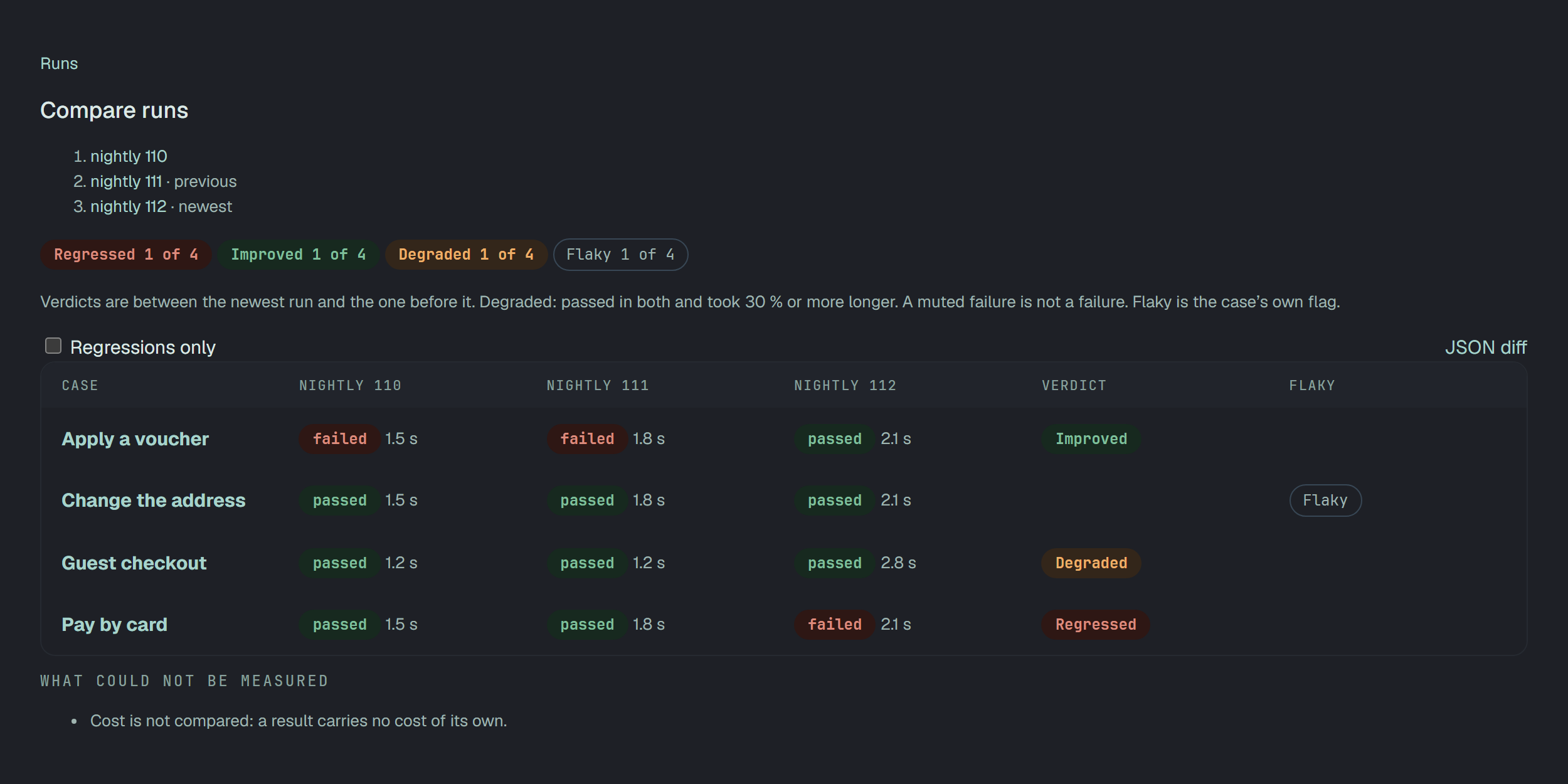
Which runs the verdicts are between
Section titled “Which runs the verdicts are between”The runs are put in the order they were created. Runs compared lists them, the last one marked newest and the one before it previous. Every verdict is between those two; the other runs are there for context, in their own columns.
A case is read by its latest result in each run. A case run on several configurations counts by its worst result in that run.
The counters
Section titled “The counters”| Counter | Counts | Out of |
|---|---|---|
| Regressed | cases that passed in the previous run and failed or broke in the newest | the cases with a result in both of the last two runs |
| Improved | cases that failed or broke in the previous run and passed in the newest | the same |
| Degraded | cases that passed in both and took 30 % or more longer in the newest | the same |
| Flaky | cases marked flaky | every case in the table |
Under them the page says the rule in one line: Verdicts are between the newest run and the one before it. Degraded: passed in both and took 30 % or more longer. A muted failure is not a failure. Flaky is the case’s own flag.
The table
Section titled “The table”A row per case, in the order of their names:
- Case — the case, linked to its page.
- A column per run, oldest first: the status and how long it took. A dash means the case has no result in that run.
- Verdict — Regressed, Improved or Degraded; empty when nothing of the three happened, and when the case has no result in one of the last two runs.
- Flaky — the case’s own Flaky mark. It sits beside the verdict and never changes it.
Regressions only keeps the rows whose verdict is Regressed. With none, the page says No case failed now that passed before.
JSON diff opens the same comparison as JSON: the answer of GET /v1/runs/compare, the one the page
draws.
What could not be measured
Section titled “What could not be measured”The block under the table is always there. It names what the comparison could not judge:
- N of M cases have no result in both of the last two runs, so they have no verdict.
- N passed cases have no duration in one of the last two runs, so “degraded” could not be judged.
- Cost is not compared: a result carries no cost of its own. This line is on every comparison.
When it does not open
Section titled “When it does not open”| The page says | Why |
|---|---|
| Pick at least two runs — Tick two or more runs on the Runs list and press Compare. | The address names fewer than two runs. |
| A run was not found — One of the runs is deleted or is not in this project. | One of the runs is in the Bin or belongs to another project. |
The API
Section titled “The API”GET /v1/runs/compare?ids=<id>,<id> takes 2 to 10 run ids, comma separated, and answers with:
runs— the runs in the order they were created, andpreviousRunIdandnewestRunId, the two the verdicts are between;counters—compared(the cases with a result in both of those runs),regressed,improved,degraded,flakyandcases;cases— per case itstitle,flaky, acellsentry per run (statusanddurationMs, ornull) and itsverdict:regressed,improved,degraded,same, ornullwhen the case misses one of the two runs;notMeasured— codes with their numbers:no_verdict,no_durationand, always,cost_not_compared.
Fewer than two ids or more than ten answers 400 · ids: name 2 to 10 runs, comma separated. A run
that is in the Bin or not in the project answers 404 · one of the runs was not found.