

Cases from a ticket
Create cases from a ticket writes test cases from a story with the project’s own AI. You give it a Jira ticket key or paste the ticket’s text, and the cases arrive in the review queue as proposals. Nothing reaches Test cases until a reviewer approves one.
The button is in Review, beside the queue’s title, and in the empty queue under Or start from a ticket. An owner, a manager or a member starts a run; a reader sees Creating cases from a ticket needs the member or owner role. Your role in this project is read-only. and no form.
Before you start
Section titled “Before you start”- The project’s AI is connected and on, in Settings → AI. The run is sent to that provider and paid with the project’s key; it counts in the project’s monthly AI limit. Without a provider the page says No AI provider is connected for this project., and with AI turned off AI is disabled for this project.
- For a ticket key, Jira is connected to the project, in Settings → Integrations. Until it is, Ticket key is off and the page says Ticket key needs Jira connected to this project — an owner connects it in Settings → Integrations. Until then, paste the ticket’s text. A plan without issue trackers refuses the ticket key too, in the plan’s own words. Paste text works without Jira.
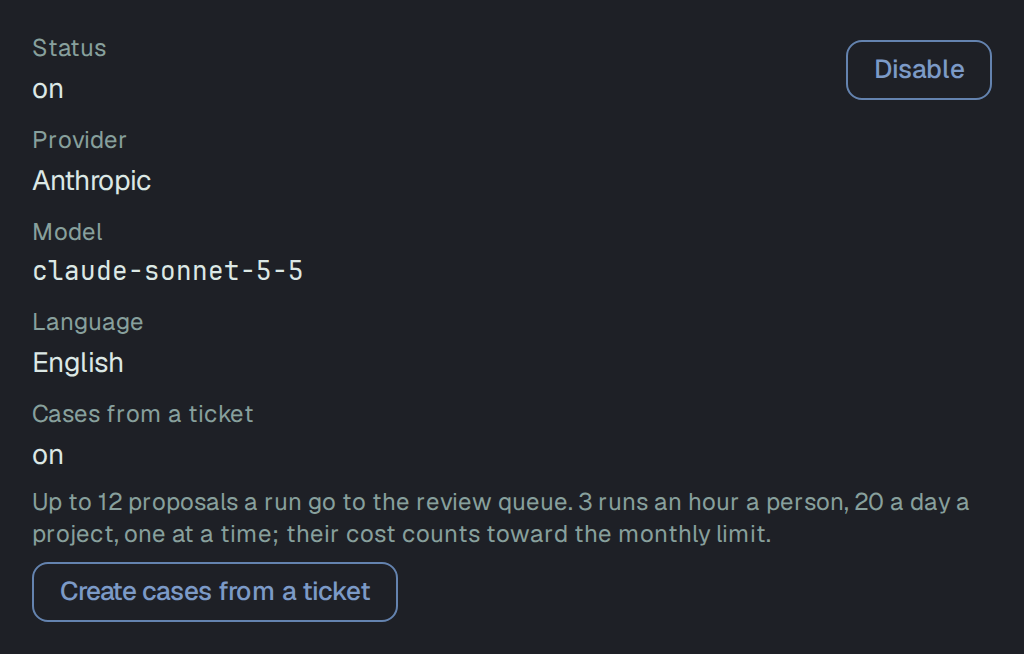
Settings → AI shows the feature as a fact of the page, not a switch of its own: Cases from a ticket is on with the rest of AI, off, with the rest of AI when AI is off, and not available to a member with no provider connected (an owner sees the form to connect one instead). While it is on, the row gives the run’s limits and, for a role that may start a run, Create cases from a ticket.
1 Text
Section titled “1 Text”Where the cases come from has two choices.
Ticket key. Write the key as Jira does, such as KAN-12: capital letters, a hyphen, then a number.
Nothing is read until you press Preview; then Plune reads the ticket’s summary, description,
acceptance criteria, type, priority, components and labels from the project’s Jira. Nothing is
written to Jira.
Paste text. Title (optional) names the source of the proposals, up to 300 characters. Ticket text takes the description and the acceptance criteria, as in the ticket, up to 12,000 characters. Past that the field says The text is 12,480 characters; at most 12,000 go to the model — shorten it. and Preview stays off.
Pasted text needs at least 20 words, and so do a ticket’s description and acceptance criteria together. Under the field:
Keys and tokens in the text are masked before anything is sent. Names, phone numbers and e-mails are not — remove them yourself.
2 Preview
Section titled “2 Preview”Preview sends nothing to the model and spends nothing. It shows:
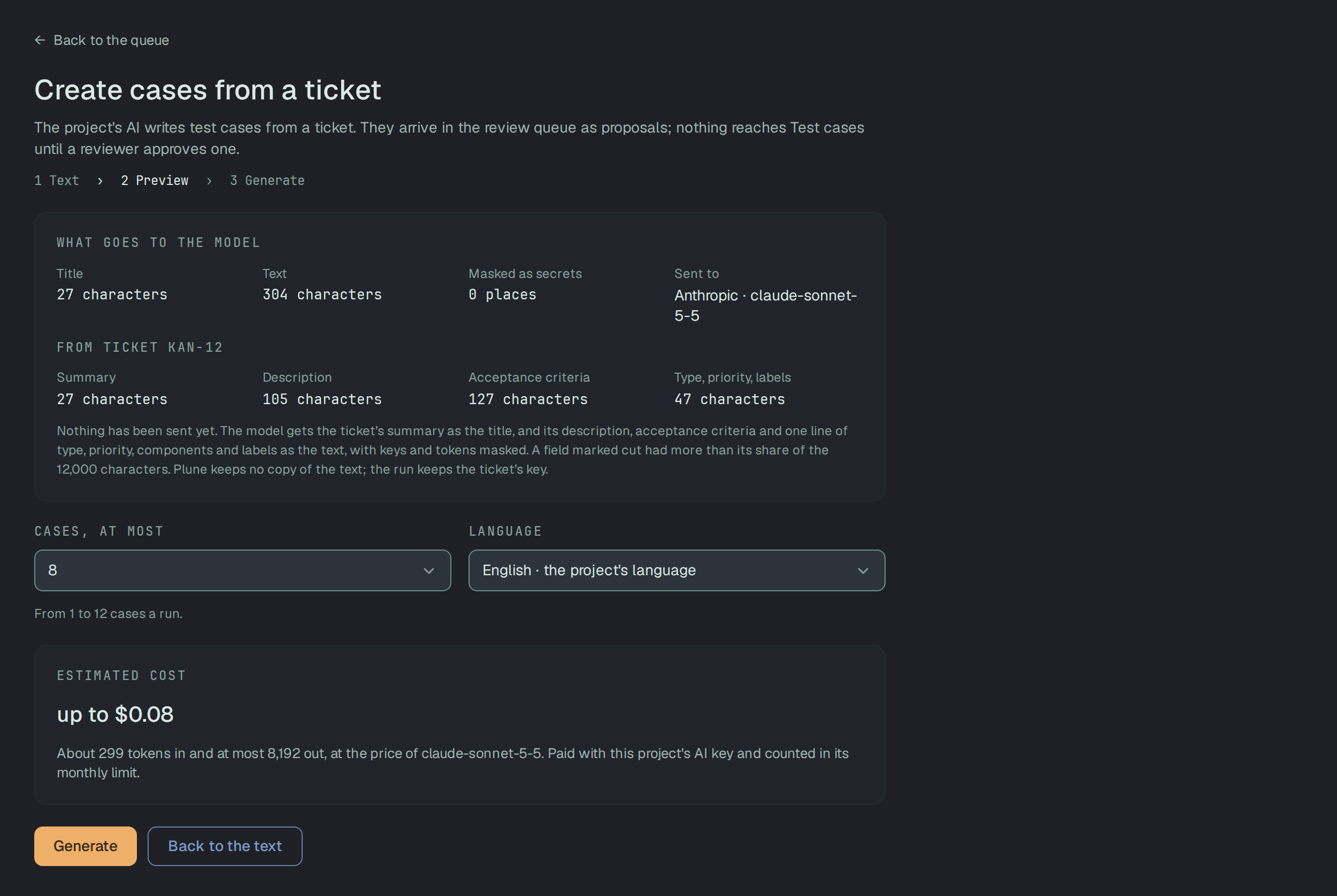
- What goes to the model — the characters of Title and Text, how many places were Masked as secrets, and Sent to: the provider and the model. For a ticket, From ticket KAN-12 lists Summary, Description, Acceptance criteria and Type, priority, labels with their characters. The model gets the summary as the title and the rest as the text, 12,000 characters at most; a field marked cut had more than its share.
- Estimated cost — up to the most the run can cost: the input’s tokens at the model’s price, plus the answer up to its ceiling of 8,192 tokens. Paid with this project’s AI key and counted in its monthly limit. When Plune has no price for the model, the line is Price unknown, and the tokens are still counted.
- Cases, at most — from 1 to 12 a run, 8 when you do not change it — and Language, the project’s language unless you pick another.
For the project’s owner, when 80 % of the month’s AI limit is used, a notice says how much of it is gone and what this run can add, with Change the limit.
Plune keeps no copy of the text: only a fingerprint, to notice the same text again. A run from a ticket keeps the ticket’s key.
The same ticket again
Section titled “The same ticket again”When the project already has proposals or cases from this ticket (or from this pasted text), the preview says Cases or proposals from this ticket already exist. Generating again may add the same cases twice. Already from this ticket lists them: In the review queue with each proposal’s state, then Test cases, each a link. The button reads Generate anyway, and Cancel goes back to the queue.
A ticket is matched by its key, pasted text by its fingerprint. The same request again within 10 minutes is not a new run: it answers with the run it already made, at no new cost.
3 Generate
Section titled “3 Generate”The first time you generate in a project, Before the first run says what is sent, what is not kept and what is not removed, and Generate confirms it. Your browser remembers that you saw it.
The run waits in a queue: one run at a time goes through for each project. While it shows queued — Waiting for its turn — Cancel the run takes it back to the preview, and nothing was sent. Once it is running it can no longer be cancelled: the text has reached the model. A run takes up to a minute, and you can leave the page; the proposals appear in the queue when it ends.
8 proposals are in the review queue. Added to the queue counts them, Left out counts the ones the model wrote that could not be proposals and says why (invalid steps, an invalid field, over the limit), then Tokens and Cost.
Proposals of this run → opens the queue narrowed to this run. Open the review queue and Create more are under the card.
Failed
Section titled “Failed”The run failed and Nothing was added to the review queue., with the reason above the card and Try again or Back to the text:
| The page says | What happened |
|---|---|
| The model did not answer within 60 seconds. | The provider was too slow. |
| The run stopped without finishing. | The run sat queued or running past its time. |
| The project’s AI was turned off or disconnected after the run was queued. | Settings → AI changed while it waited. |
| This project’s monthly AI limit ran out while the run waited in the queue. … | The model was not called and nothing was spent. |
| The review queue was full when the cases were ready; none were added. … | The queue holds 1,000 waiting items; work it down first. |
A provider’s refusal (a rejected key, a rate limit, an invalid answer) is said in the same words as in Draft from code.
When a ticket is refused
Section titled “When a ticket is refused”Every refusal comes before the model is called and costs nothing. The page shows the server’s
sentence. Each answer carries a code:
code | Status | The page says |
|---|---|---|
jira_not_connected | 424 | No Jira is connected to this project — paste the text of the ticket instead. |
jira_not_working | 409 | The project’s Jira connection is not working — its owner sees why in Settings → Integrations. |
jira_ticket_not_found | 424 | Jira did not give ticket KAN-12: it does not exist, or the account of the project’s connection may not see it. Check the key in Jira, or choose Paste text and paste the ticket’s text. |
jira_forbidden | 424 | Jira refused the account of the project’s connection the ticket KAN-12. |
jira_token_rejected | 424 | Jira rejected the token of the project’s connection — its owner connects it again with a new token. |
jira_ip_blocked | 424 | Your company’s Jira accepts requests only from a list of addresses — add Plune’s address to it. |
jira_rate_limited | 424 | Jira asked Plune to slow down — try again in 30 seconds. |
jira_unavailable | 424 | Jira did not answer — try again in a few minutes. |
jira_unexpected_answer | 424 | Jira gave an answer Plune cannot use — check the address of the project’s Jira connection in Settings → Integrations. |
ticket_too_empty | 422 | Ticket KAN-12 has, in its description and acceptance criteria, fewer than 20 words — too little to write cases from. |
For jira_token_rejected and jira_not_working an owner also gets Open Settings → Integrations.
A rejected token and an address allowlist are recorded on the connection, so the token is not sent
again until an owner acts in Settings → Integrations; until then the answer is jira_not_working. jira_rate_limited carries Retry-After and
retryAfterSec with Jira’s own wait.
Limits
Section titled “Limits”A person starts at most 3 runs an hour, a project 20 in 24 hours, and one at a time. A run over a limit
is refused 429 with Retry-After, and Generate sleeps until then:
- You have started 3 runs in the last hour. You can start another in 12 minutes — at 14:20.
- This project has started 20 runs in the last 24 hours. The next one can start in 3 hours — at 17:05.
- Another run of this project is still going. Try again when it ends.
The month’s AI limit, a full review queue and these run limits refuse a ticket before Jira is asked, except when the same ticket made a run within the last 10 minutes.
In the review queue
Section titled “In the review queue”Each proposal is manual, waits as pending, and names its source: Jira ticket with the key, or pasted text with the title (the start of the text when there was none). In a project with Jira connected the key is a link to the ticket in Jira. A proposal’s page says Case proposal · AI from text and adds Run cost — the run’s tokens and how many cases it proposed.


Source and Run
Section titled “Source and Run”Two filters over the queue’s kinds narrow the proposals:
- Source — All sources, or any of Jira ticket, pasted text, API operation, requirement and address.
- Run — All runs, or one run: Run · 2026-11-09 14:02, when it started. A run is picked from its Proposals of this run → link, not from the menu.
Each pick shows as a chip with its own way off, and 3 proposals match these filters. says how many are on screen. With nothing left, No proposal matches these filters. names what is in force, and Clear filters takes them all off. Both filters stay in the page’s address, so a reload keeps them. Only proposals have a source and a run: under another kind the filters are off, with Only proposals have a source and a run: pick All or Proposals to narrow by them.
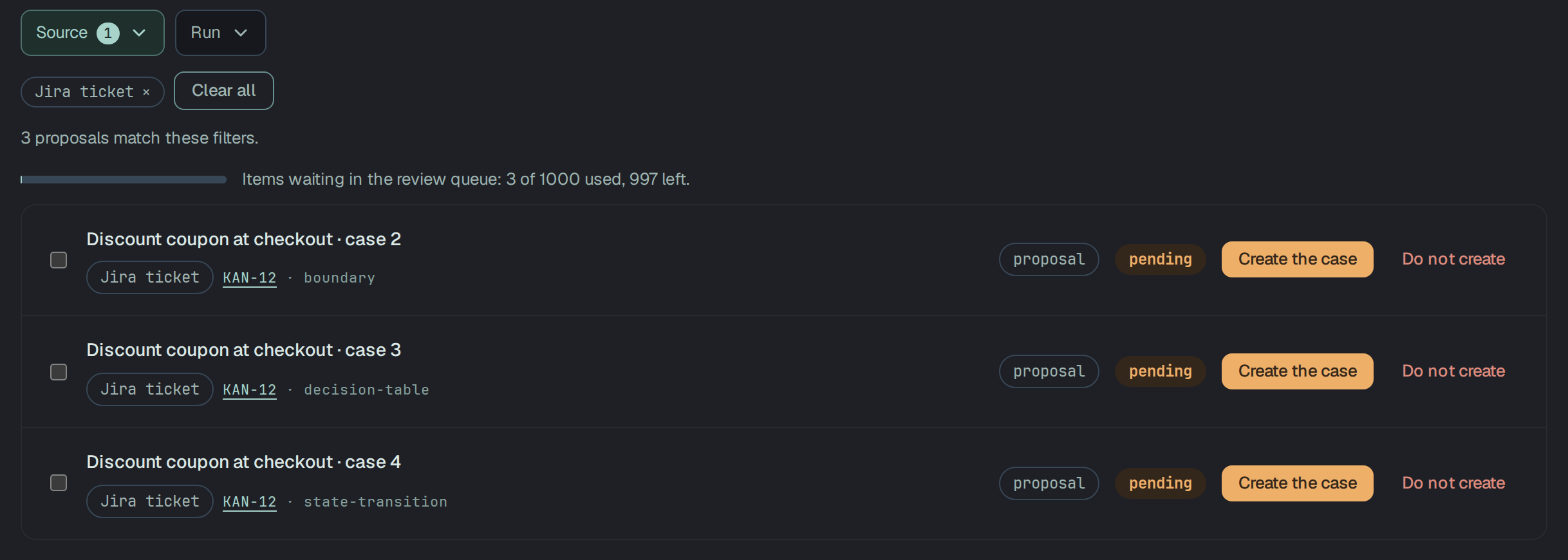
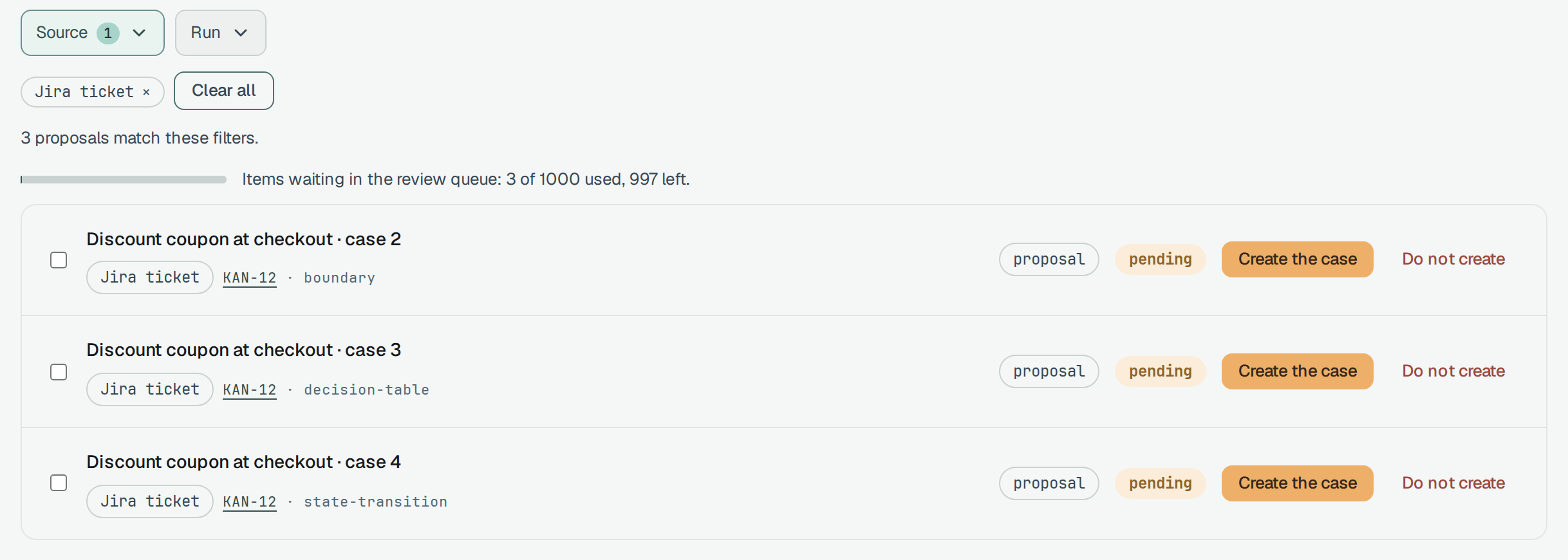
The API takes the same as GET /v1/review-items?source=jira-ticket,pasted-text&generationId=<run id>.
An unknown kind of source is 400 invalid_source; a run of another project is an empty page.
Edit before you approve
Section titled “Edit before you approve”While a proposal is pending or has Changes requested, Edit on its page lets an owner, a manager or a member correct it: the title (up to 300 characters), 1 to 20 steps (up to 400 characters each, in any order) and the expected result (up to 2,000 characters). Review changes compares your version with the agent’s, and Save changes saves it as a new version. Where the review policy asks for approvals and this version has some, the form says first: Saving resets 1 approval. Reviewers who approved this version will be asked again.
The agent’s original is kept with the entry, and the proposal shows Edited by reviewer with View the agent’s original. Approving makes the case from your version.
Placeholders block the approval
Section titled “Placeholders block the approval”A proposal that still holds a placeholder cannot be approved:
{{name}};[TODO],[TBD],[FIXME]or[XXX], or the same in<…>, with or without text after it ([TODO: which plan]);- three or more underscores on their own (
Enter ___ in the field).
Plain [Enter] or <button> is not a placeholder. The page names each place — 1 placeholder is not
filled in: step 2 — [TODO]. Edit the proposal to fill it in; then it can be created. — and Create
the case stays off with Fill in the placeholders first. beside it. Edit, fill them in, save,
and the case can be created. The server refuses the same approval 409 with code: policy_refused
(Check: placeholder).
Link the case to its requirement
Section titled “Link the case to its requirement”Once a proposal from a ticket is approved and its case exists, its page offers Link to requirement KAN-12, unticked:
Requirement KAN-12 will be created if this project does not have it, and this case will be linked to it.
Tick it and press Link. A requirement made this way is a user story titled with the key. The page then says Linked to requirement KAN-12, with a link to it; a reader sees that line once the link exists, and no checkbox before. Nothing is linked unless someone ticks it.


The same call is POST /v1/test-cases/{id}/requirements/by-key with { "key": "KAN-12" }: 201 when it
linked, 200 when the case was linked already, both with requirement and the case’s requirements.
It refuses 400 invalid_key (KAN-12 cannot be the key of a requirement in Plune, so there is nothing
to link to.), 404 not_found when the case is gone, and 409 archived when the requirement is in
the archive (Restore it on its page, then link the case.). The create and the link are one
transaction. See Requirements.
Through the API
Section titled “Through the API”The page is four calls under the project, /v1/projects/{id}/case-generations:
| Call | What it does |
|---|---|
POST …/preview | What would go to the model, the estimate and the duplicates. Nothing is sent, stored or counted. |
POST … | Starts a run: 202 with it, queued. An API token starts one from pasted text; a ticket key needs a person in a session, and a token is refused 403. |
GET …/{generationId} | Where the run stands, its counts and its cost. Anyone in the project. |
DELETE …/{generationId} | Cancels a run still in the queue; a run already sent is 409. |
Both POSTs take the same body:
{ "input": { "kind": "jira-ticket", "key": "KAN-12" }, "maxCases": 8 }or { "kind": "pasted-text", "title": "Password reset", "text": "…" } as input, with language and
confirmDuplicates: true when you mean to generate again. Without it, a run over existing proposals or
cases is refused 409 duplicate_source with the duplicates. Reading a ticket is a person’s too:
a token’s preview of a ticket key is refused 403.
A run started with a token is the token owner’s: it counts in their 3 runs an hour, in the project’s
20 a day and in the monthly AI limit, the same as a run from their session. An agent connected over
MCP starts one with plune_cases_generate and follows it with
plune_cases_generation_get (CLI 0.34.2 and later).