

Review policy
The review policy is how a project runs its review queue: who may approve, how many approvals an approval needs, who is asked to review, and whether an item with all its approvals is approved by itself. The server applies it when an item is approved, when changes are requested and when a source is trusted, from the dashboard and from the API alike.
The policy is about what would become a case: a case proposal and a discovered test. A disputed result creates nothing, and the policy does not apply to it.
The settings
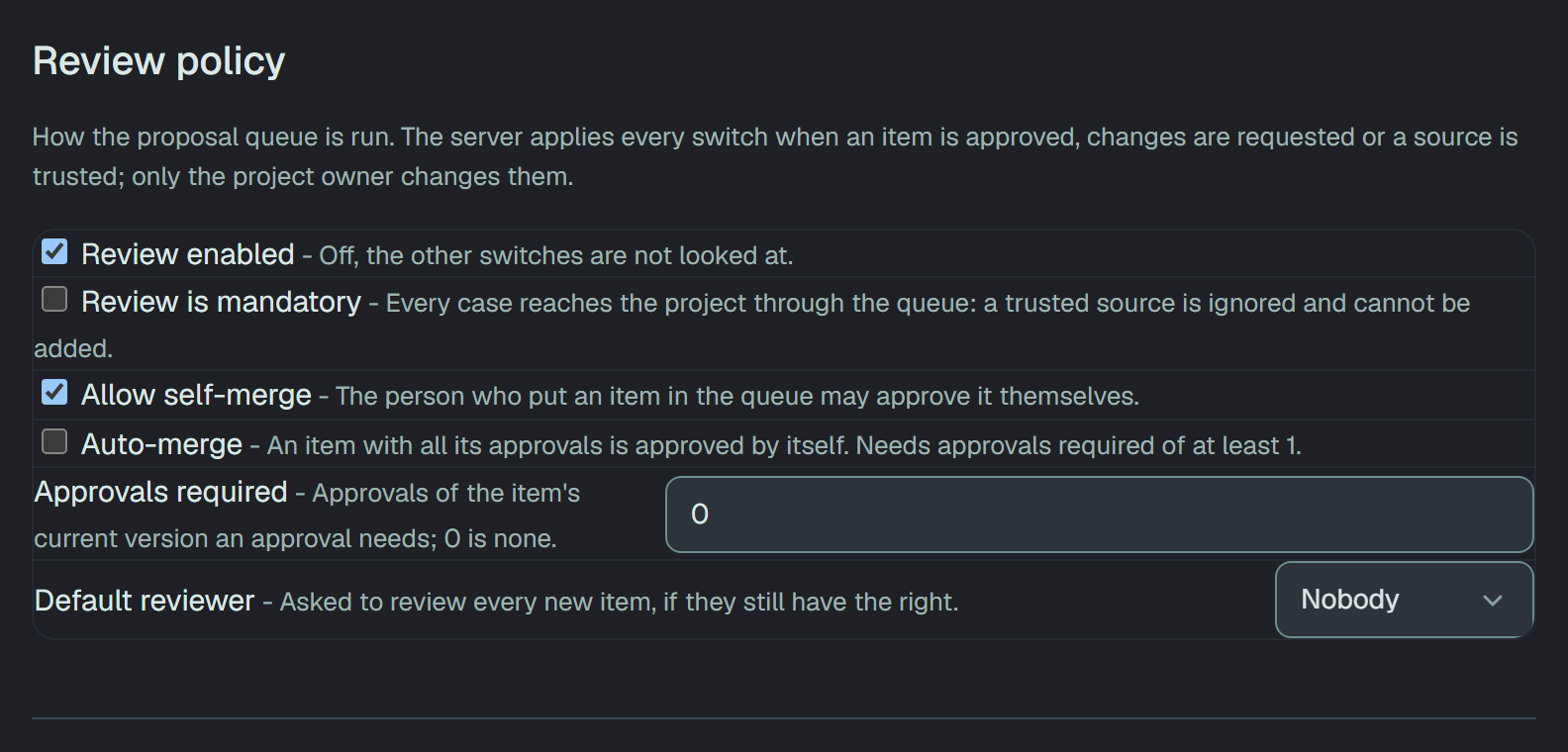
Section titled “The settings”Settings → General → Review policy: How the proposal queue is run. The server applies every switch
when an item is approved, changes are requested or a source is trusted; only the project owner changes
them. Everyone in the project sees the section; anyone but the owner reads Only the project owner
changes the review policy. with every control greyed, and the API answers 403 · project owner only.
| Setting | Default | What it does |
|---|---|---|
| Review enabled | on | Off, the other switches are not looked at. The queue itself works as before. |
| Review is mandatory | off | Every case reaches the project through the queue: a trusted source is ignored and cannot be added. |
| Allow self-merge | on | The person who put an item in the queue may approve it themselves. |
| Auto-merge | off | An item with all its approvals is approved by itself. Needs approvals required of at least 1. |
| Approvals required | 0 | Approvals of the item’s current version an approval needs; 0 is none. From 0 to 10. |
| Default reviewer | Nobody | Asked to review every new item, if they still have the right. Any member who can write. |
Two combinations cannot hold, and the section says so before anything is sent:
- Auto-merge with Approvals required at 0: Auto-merge approves an item by itself once it has all its approvals, so it needs at least 1 required approval. Set the number first, or turn Auto-merge off before going down to 0.
- Review is mandatory while Review enabled is off: Review can be mandatory only while it is on.
While review is mandatory, a source cannot be added to the
trusted sources: the save answers 409 · review is mandatory: every case reaches this project through the review queue, so a source cannot be trusted.
Who reviews
Section titled “Who reviews”A reviewer is a member who can write: an owner, a manager or a member. A read-only member reads the item and its reviewers and is offered nothing to press. The person who put an item in the queue is never its reviewer: they cannot be added, cannot request changes on it and cannot add their approval. Whether they may approve it themselves is Allow self-merge.
On the item’s page, Reviewers lists the people asked, or says Nobody was asked to review it. While the item waits, Add reviewer asks one more and Remove beside a name takes that person away. A new item starts with the Default reviewer; one who can no longer review (who left the project or became read-only) is not asked, and the item says N was not asked: no longer has the right to review. An item holds up to 20 reviewers.
Request changes
Section titled “Request changes”On a case proposal or a discovered test that is pending, a reviewer can press Request changes and say what has to change, in 10 to 2,000 characters: Say what has to change. The item moves to Changes requested and stays there until the author re-submits it.
The item’s state is then Changes requested. Its page opens with Changes requested by, the reviewer’s name and what they wrote, then It cannot be approved until the author re-submits it., and the queue has a Changes requested filter. An item in this state cannot be approved, and approvals cannot be added to it; it can still be rejected.
The author re-submits by sending the same proposal again, for example with the next ingest of the Cairn run that proposed it. The item takes the new version, goes back to pending, and the request is gone. Only the author’s own item is replaced this way.
Changes can be requested only while review is enabled, and only on a pending item.
Approvals
Section titled “Approvals”With Approvals required above 0, a pending item shows Approvals of this version: 1 of 2 and Add my approval. One approval counts per person, and only on the item’s current version.
The version goes up when the author re-submits the item and when a reviewer edits the proposal. An edit warns Saving resets N approvals. Reviewers who approved this version will be asked again. A reviewer whose approval was for an earlier version reads Your approval was for an earlier version. This is version N: confirm it again with Add my approval.
Approving the item — the verdict that creates the case — is refused, with the reason on the item, when:
- changes were requested on it and the author has not re-submitted it;
- Allow self-merge is off and you put it in the queue;
- it has fewer approvals of its current version than Approvals required.
In a batch decision such an item is skipped with refused by a rule of the project: open the item to see which; repeating the decision will not help.
Auto-merge
Section titled “Auto-merge”With Auto-merge on, the approval that completes the number asked for approves the item at once, in the name of the person who gave it. The audit log marks that approval as automatic. If approving the item is refused at that moment, for example when the project has no room for another case, the approval stands and the item waits.
While an item has its approvals but is not approved, its page says what holds it back, under Auto-merge is waiting:
| The item says | What to do |
|---|---|
| A request for changes is open. | The author re-submits it. |
| An approval was given on an older version of the proposal and does not count; that reviewer has to confirm again. | That reviewer presses Add my approval again. |
| The last person to approve can no longer save cases in this project. | Somebody who can write approves it. |
Rejecting
Section titled “Rejecting”Rejecting still takes a category and an explanation of 10 to 2,000 characters, with or without a policy: see the review queue.
The API
Section titled “The API”PATCH /v1/settingswithreviewPolicy:enabled,mandatory,allowSelfMerge,autoMerge,approvalsRequired(0 to 10) anddefaultReviewerId(a user id, ornull). A key left out takes its default. The two combinations above answer400; a default reviewer who cannot write answers400·the default reviewer must be a member of the project who can write.POST /v1/review-items/{id}/changes-requestedwith{ "note": "Step 2 needs the expected total" }— the item becomeschanges_requested.POST /v1/review-items/{id}/approvals— your approval of the current version. With auto-merge on, the approval that completes the set answers with the approved item.PUT /v1/review-items/{id}/reviewerswith{ "reviewers": ["<user id>"] }— the whole list, up to 20; it replaces the one on the item.
A review item carries revision, reviewers, defaultReviewerSkipped, approvals (each userId,
at, revision) and, while changes are requested, changeRequest (by, at, note, revision). A
rule of the policy that refuses an action answers 409 with the reason.